> ## Documentation Index
> Fetch the complete documentation index at: https://docs.useparagon.com/llms.txt
> Use this file to discover all available pages before exploring further.
# Scheduler Trigger
The Scheduler trigger is used for workflows that should run automatically at a **scheduled time or interval**.

The Scheduler trigger provides the following scheduling options:
* **Seconds** (e.g. every 5 seconds)
* **Minutes** (e.g. every 30 minutes)
* **Hourly** (e.g. every hour at 15 minutes past the hour)
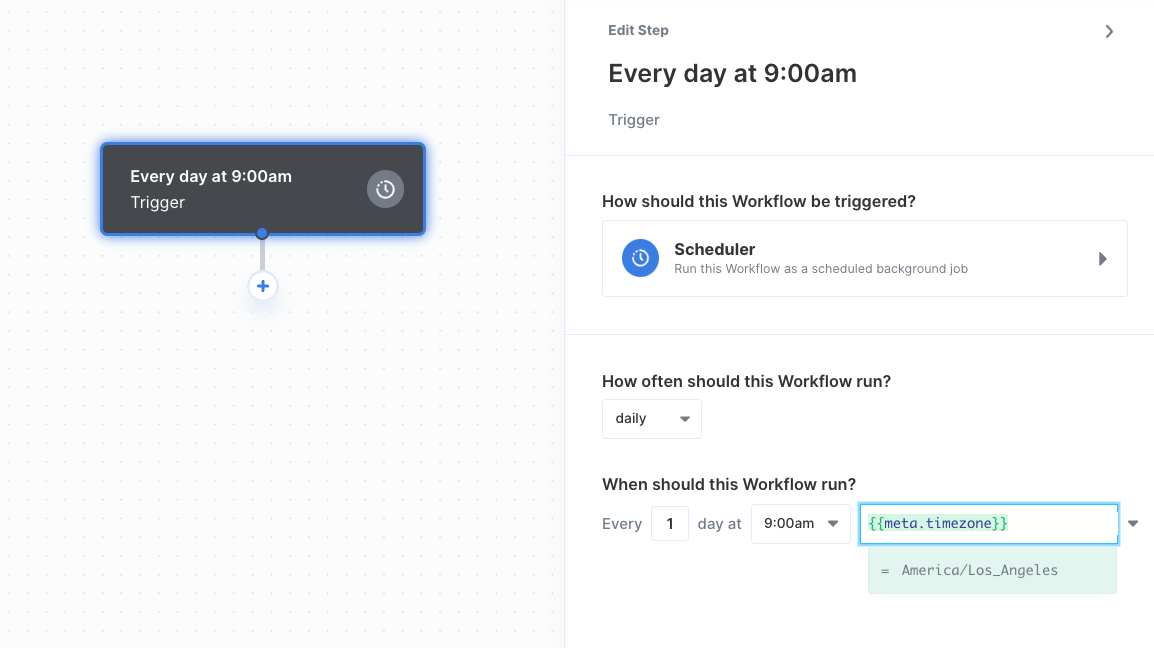
* **Daily** (e.g. every 2 days at 9:00 am)
* **Weekly** (e.g. every Monday at 12:00 pm)
Once deployed, the workflow will run automatically at the designated time for all users who have activated the workflow in their Connect Portal.
### Configuring Variable Time Zones
You can configure the Scheduler such that workflows run at a specific time in the user's time zone by using [User Metadata](/apis/users).
Paragon uses IANA-formatted time zones. For example, you would use `America/Los_Angeles` for users in the Pacific Time Zone. You can view a full list of time zone identifiers [here](https://en.wikipedia.org/wiki/List_of_tz_database_time_zones).