

 Managed Sync
 ActionKit
 Workflows
- Managed Sync: trace a sync from its initial sync through incremental syncs, periodic full syncs, recoverable warnings, and terminal errors.
- ActionKit: trace an ActionKit tool call or trigger event, with each API call logged.
- Workflows, including trigger details from Scheduler Triggers, Request Triggers, Custom Webhooks, and App Events.
- For example, if you’d like to see how an incoming webhook event from an integration was processed, you can filter by integration and trace the resulting workflow execution.
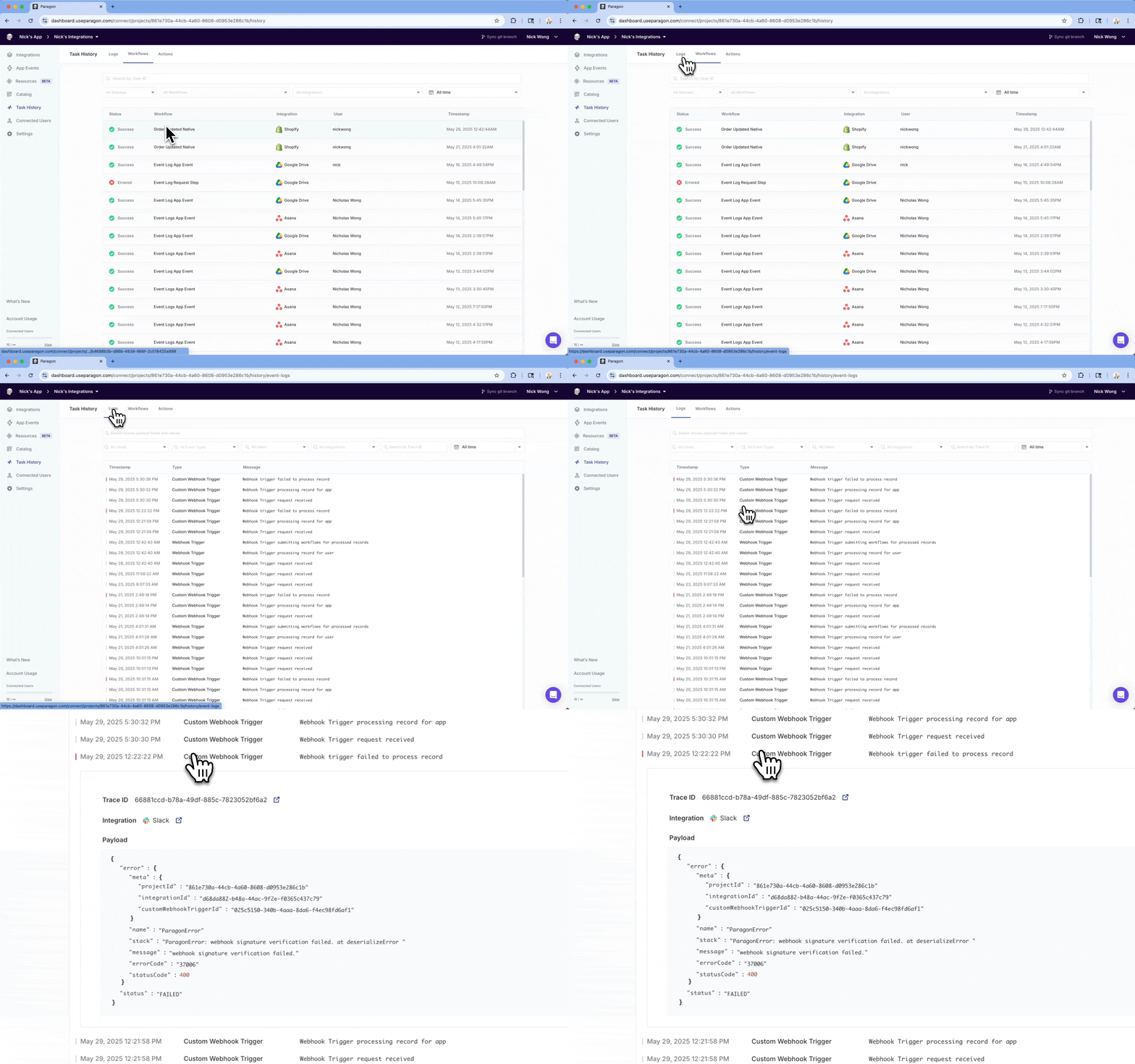
- Timestamp: The date and time the event occurred.
- Type: The Paragon feature emitting the event.
- Message: The message associated with the event.
Log Details
By expanding a log, you can view the full event object including the payload, associated Trace IDs, User IDs, and more.
🔸 Indicates an optional property
Filtering and Searching
You can filter the Event Logs view using these filter dropdowns:- Level: The severity of the event.
- Type: The Paragon feature emitting the event.
- User ID: The Paragon user ID who triggered the event.
- Integration ID: The integration associated with the triggered event.
- Trace ID: The trace ID of the event.
- Timestamp: The date and time the event occurred.
Supported Events
The following event types will appear in your Event Logs:Platform
User Credentials
User Credentials
Credential refresh events are emitted when we attempt to refresh a user’s access tokens.
We have introduced credential refresh events for select integrations, and plan to expand support over time.
- Attempted to refresh credential
- Failed to refresh credential
- Successfully refreshed credential
Workflows
App Events
App Events
App Events logs are emitted when a workflow is triggered by the Paragon SDK. Learn more about App Events here.
- App Event Trigger Started
- App Event Trigger No workflows subscribed for trigger
- App Event Trigger Submitting workflows for execution
- App Event Trigger Workflows submitted successfully
- App Event Trigger Workflow submission failures
- Error preparing workflow for event trigger
- App Event Trigger No workflow configured with event eventName
Request Trigger
Request Trigger
Request Trigger events are emitted when a workflow is attempted to be triggered by an HTTP request sent to the Paragon Request Trigger. Learn more about Request Triggers here.
- Request Trigger Started
- Request Trigger workflow submitted for execution
- Request Trigger execution response timeout occurred
- Request Trigger Failed
Integration Enabled Trigger
Integration Enabled Trigger
Integration Enabled Trigger events are emitted when a user initially actives your integration. Learn more about Integration Enabled Triggers here.
- Integration Enabled Trigger Started
- Integration Enabled Trigger workflow submitted for execution
- Integration Enabled Trigger Failed
Scheduler Trigger
Scheduler Trigger
Scheduler Trigger events are emitted when a workflow is triggered according to a Scheduler Trigger’s cadence. Learn more about Scheduler Triggers here.
- Scheduler Trigger submitting workflow for execution
- Scheduler Trigger failed to submit execution for workflow
Webhook Trigger
Webhook Trigger
Webhook Trigger events are emitted when a workflow is triggered by an incoming integration webhook. Learn more about Webhook Triggers here.
- Webhook Trigger request received
- Webhook Trigger processing record for user
- Webhook Trigger submitting workflows for processed records
- Webhook Trigger processing record for app
- Webhook Trigger submitting workflows for app users
- Webhook trigger failed to process record
- Webhook Trigger processing record for resource
- Webhook Trigger Submitting workflow for resource
- Webhook trigger failed to process record for resource
- Webhook Trigger failed to process record
ActionKit
ActionKit
ActionKit
ActionKit events are emitted when an ActionKit request is made.
- Start
{ACTION_NAME} - Completed
{ACTION_NAME} - Failed
{ACTION_NAME}
Managed Sync
Sync Lifecycle
Sync Lifecycle
Managed Sync lifecycle logs are emitted when a Sync starts or completes an initial sync, incremental sync, or periodic full sync. Learn more about monitoring Managed Sync.
- Initial sync started
- Initial sync completed
- Incremental sync started
- Incremental sync completed
- Full sync started
- Full sync completed
Sync Warnings and Errors
Sync Warnings and Errors
Managed Sync warning and error logs are emitted when a Sync is rate limited, retries after a recoverable failure, skips a full sync deletion pass, cannot be created, or enters an errored state.
- Sync rate limited, backing off for
{seconds}seconds… - Sync encountered timeout, backing off for
{seconds}seconds… - Sync warning:
{message} - Full sync interrupted, record deletion was not performed
- Sync creation failed: Invalid pipeline configuration
- Sync creation failed: Duplicate sync detected
- Sync error: Authentication Failed
- Sync error:
{message}
Sync Webhooks
Sync Webhooks
Managed Sync webhook logs are emitted when Paragon cannot deliver a Sync webhook to your configured endpoint. Learn more about Managed Sync webhooks.
- Unable to deliver sync webhook
Unsupported Events
The following events are not currently supported in Event Logs:- Task executions and their individual outbound API requests
- Requests made to or received by Resources
- Connected User events
Connecting with Event Destinations
An integration with Event Destinations is coming soon.